What is it?
The curriculum is your learning path through Lapicida — the answer to the question “what comes next?”. It isn’t a trainer itself, but the frame around all the trainers: it makes sure that sentences, forms and constructions reach you in a sensible order, instead of overwhelming you with everything at once. You decide how closely this guidance takes you by the hand — and that’s exactly what the two modes are for.
Two modes: free or guided
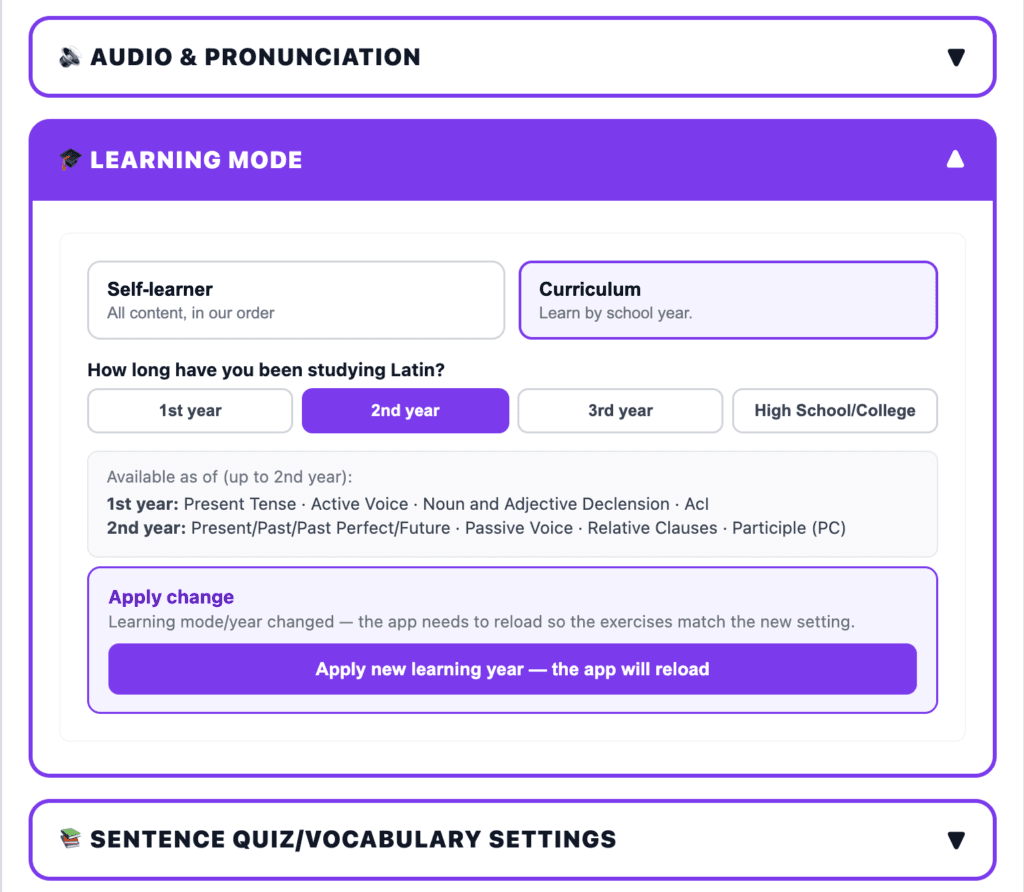
Self-study mode. Here you freely choose what you want to practise — no grid, no fixed order, no unlocking. This mode is made for anyone who already brings something to the table: for higher year groups, for university, for the Latinum, or to brush up after a break. You know where you stand and what you want to work on — so the app lets you do exactly that, without forcing a syllabus on you.
Curriculum mode. For anyone following a syllabus — typically in school lessons. Here the content is ordered by learning year: you set your learning year, and the app unlocks the right content and levels to match. You see what’s due next, and you’re not confronted with material you haven’t covered in class yet. That way the app moves in step with your course.
The syllabus we follow
Curriculum mode follows the usual structure of Latin teaching at grammar-school level — the order in which grammar is introduced across the learning years. In rough outline, this roadmap looks like this (schools and regions differ slightly in the detail):
- Year 1: the foundations — the a-, o- and consonant declensions, the cases, the present tense of the conjugations, esse and posse, adjectives, prepositions, personal and possessive pronouns; towards the end, a first cautious look at the AcI.
- Year 2: the past tenses (perfect, pluperfect) and the future, the 3rd declension, the relative clause, the passive, the participles (PPA/PPP) and the participium coniunctum.
- Year 3: the big constructions — participle constructions in depth, the ablative absolute, the subjunctive (unreal conditions, ut– and cum-clauses).
- Year 4: the finishing touches — indirect questions, consecutio temporum, the subjunctive in main clauses, deponents, gerund and gerundive, comparison of adjectives.
Important: this is a general progression, not a particular textbook. So you can use curriculum mode whatever book you happen to be working with at school.
What that does in the app
This progression sits inside Lapicida as a chain of levels — L3 to L27. Every practice sentence and every construction hangs on one of these levels. When you set your learning year in curriculum mode, the app unlocks exactly the levels that belong to it — and holds back the more advanced material until it’s due. You work your way up level by level, on solid ground, without gaps.
On top of that, every single sentence carries two difficulty values — its “band”: one for reading difficulty (how hard the sentence is to read at all — vocabulary, length, sentence structure) and one for target difficulty (the grammatical construction you’re meant to practise on it). This split is the clever part: it lets the app show you a difficult construction on a linguistically easy sentence — you practise the new thing without failing on the vocabulary at the same time. The challenge fits the individual sentence, not the lesson as a whole.
How does it connect to the modules?
The curriculum doesn’t steer one module, but all of them: the vocabulary trainer, forms trainer, sentence quiz, Sensus and reading all draw on the same sentence database. When you set your learning year, you get the matching sentences and levels everywhere — the trainers stay what they are, but the selection follows your level. That way the modules pull in the same direction, instead of each setting its own pace.
For teachers
If you teach a class, you can set the class’s learning year centrally. Your students then see exactly the content that matches their year — without you unlocking individual levels by hand or everyone having to find the right setting themselves. That keeps the app in time with your lessons: what you’ve covered in the course is unlocked; what’s still to come waits its turn. The curriculum follows the usual structure of Latin teaching, but is tied to no particular coursebook.
What you get out of it
In practice: you never have to guess whether a sentence is “too early” for you. Curriculum mode takes the ordering off your hands; self-study mode gives it back when you want to hold the reins yourself. Both without any rebuilding — a single switch is enough.
Scientifically: a learning path that doses difficulty just right keeps you in the zone where real learning happens — demanding, but not overwhelming. Learning research calls such well-chosen hurdles “desirable difficulties”: they feel more strenuous, but they anchor more durably (Bjork, 1994). That’s exactly what the sentence band is for.
Common questions
Do I have to commit to one mode?
No. You can switch between self-study and curriculum at any time — your progress is kept in both modes.
Is the curriculum tied to a textbook?
No. It follows the general structure of Latin teaching by learning year, not a single coursebook. So you can use it regardless of which book you’re working with at school.
How does the app know what I already know?
In curriculum mode, through the learning year you’ve set (or the class learning year set by the teacher). As a self-study learner, you decide for yourself what’s unlocked.
Try it now
Set your learning year or simply get going as a self-study learner — no account, no credit card. Start for free →
← Back to overview · on to the Story or to the Settings